
MSX.emu
Future updates will add support for the Sega SG-1000.
The majority of BlueMSX features required to run most games are already supported with more coming soon (tape support, improved on-screen keyboard, etc).
The app is tested on the Xoom, Galaxy S2, Nexus 4, Nexus 7, NVidia Shield, Xperia Tablet Z, and Xperia Play, but works on virtually any device with similar or better specs.Note: Additional MSX system files are required to use the app with floppy disk images.
A BIOS is needed if emulating ColecoVision.
See the website for setup instructions.
Features include:* Supports ROM (.rom, .mx1, .mx2, .col) and Disk (.dsk) programs, optionally in ZIP, RAR, or 7Z files* SCC and FM sound support* Internal SRAM and save state support, auto-save and ten manual slots for save states.* Configurable on-screen multi-touch controls* HID Bluetooth/USB gamepad & keyboard support compatible with any input device recognized by the OS (MOGA Pro, etc.), Wii controllers also supported if running Android 4.1 or lower, all devices support custom key profiles* Works in any orientation
No ROMs are included with this app and must be supplied by the user.
Transfer games anywhere to your internal storage/SD card and browse to them from within the app (default SD card directory is /mnt/sdcard).
Follow me on Twitter for updates about my apps:https://twitter.com/rakashazi
Visit the homepage at explusalpha.com for more info & apps, ports for other platforms, and GPL source code.
Please report any crashes or device-specific problems via email (include your device name and OS version) so future updates continue to run on as many devices as possible.
About MSX.emu
- Package name (App ID)
- com.explusalpha.MsxEmu
- Available on
- Google Play
- Price
- $7.99
- Developer
- Robert Broglia
Looking for the MSX.emu APK?
The safest way to get MSX.emu (com.explusalpha.MsxEmu) on your Android device is to install it directly from Google Play — you'll always get the latest official version, automatic updates, and no risk of modified or infected APK files from third-party sites.

Music Features
Enjoy high-quality music streaming and playback features.
Social Features
Connect and share with friends and the community.
Gaming Features
Enjoy immersive gaming experience with various game modes.
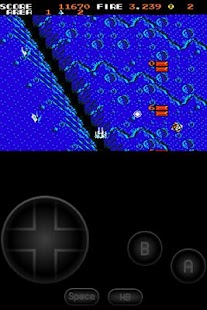
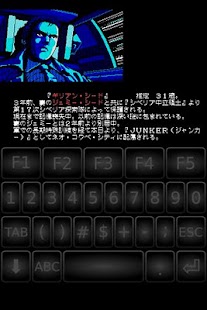
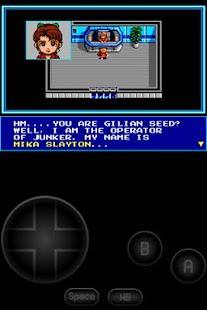
MSX.emu の動作を見る
ユーザーの評価
私たちの言葉だけを信じないでください。このAndroidアプリについてユーザーが何と言っているかをご覧ください。
"Pretty good, but I would like an option to crop the borders. Also, there's some kind of bug or error that makes the on screen keyboard not work for colecovision games, as well as some games thinking you're holding down the fire buttons once you exit and re-enter it."
"Excellent emulator,but how do you run dsk files"
"Great👍"
"Another crappy computer emulator that only works for games and not computing."
"I would give this 5 stars but the developer choose not to support his customers. I want to use colovison roms and the built In keyboard doesn't work for colovison roms. I have no problem with an external joystick but using the built in keyboard for msx doesnt support colovison roms. Msx1 and msx2 roms have no issue with the keyboard. Please email me and I change my review. So if your buying this for colovison roms for using it on a mobile it does not work. You need to map an external joystick but the keyboard works great for msx1 and msx2 roms. Such a pity the mx keyboard doesn't support colovison roms and the description says it does."
"Completely incompatible with all the coleco roms I tested. Get ColEm imstead."
"Robert's emulators are the best and are so polished. I have never had any issues with any of them on all my devices. If I have had any questions, he quickly responds! Get his emulators, you will not regret it!"
"Awesome emulator, great job."
"While this is primarily MSX it is the best Coleco emu on Android. The Colem one has terrible sound (Try Space Panic, all wrong on Colem) and some games even lag on an Nvidia Shield! This one has MUCH more accurate sound emulation but is not perfect (the digitized voices in games like Squish-em don't work right). Works great on Nvidia Shield with real controls."
"I own all of Robert Broglia's emulators, and they are always the best. With a very consistent interface and high compatibility/performance, they set the standard. My only complaint is that he should make more of them!!"
Frequently Asked Questions
Is MSX.emu free?
MSX.emu is a paid app — it costs $7.99 on Google Play. You pay once through your Google account and can install it on your Android devices.
How do I install MSX.emu on Android?
Open Google Play on your Android phone or tablet, search for MSX.emu by Robert Broglia or tap the Google Play button on this page, then tap Install. The app downloads and installs automatically.
What is com.explusalpha.MsxEmu?
com.explusalpha.MsxEmu is the App ID (package name) of MSX.emu on Google Play. Every Android app has a unique package name, and it is the safest way to verify you are installing the official app.
Is MSX.emu safe to download?
Installing MSX.emu from Google Play is the safest option: you get the official version published by Robert Broglia, verified by Google Play Protect, with automatic updates. Avoid APK files from unofficial third-party sites.

Get MSX.emu Today
MSX.emu for Android — $7.99 on Google Play.
Compatible with Android phones and tablets — available on Google Play.